Showing posts with label susse. Show all posts

Friday, June 10, 2011

Get Ready for LibreOffice 3.4

LibreOffice 3.4 is approaching. The second release candidate for 3.4 was released on May 27, and has improvements for Writer, Calc, and much more. Ready for a look?

The upcoming release of LibreOffice 3.4 is slightly overshadowed by the announcement that Oracle is proposing OpenOffice.org as an Apache Incubator project. What does that mean for the free office suite landscape? It's far too soon to tell, though Apache president Jim Jagielski has reached out to The Document Foundation about cooperation. I'm cautiously optimistic that the projects will find a way to work together and benefit the rest of the FOSS community.

But for now, LibreOffice is the only project with an imminent release — so let's take a look at that and what's in store.

LibreOffice is focusing on more modest, time-based releases. This means that 3.4 doesn't have massive new features, but it does have a slew of performance improvements and minor new features that make life a little better. Let's take a look at some of the highlights.

Sadly, the LibreOffice folks still haven't implemented vi-like keybindings for Writer. (OK, that may only be sad for some of us, but still...) But Writer still has a few minor features that you might enjoy.

If you do a lot of footnotes and bullets, you're going to find this release interesting. LibreOffice now has support for Greek (upper and lower case) letters for bullets — not something that I've had call for yet, but might be of interest to some users. (Testing this feature shows that I'm not, in fact, up on my Greek alphabet...) You'll find this in the Options tab of the Bullets and Numbering dialog.

If you're working on a paper or document that will be printed in color, or distributed as a PDF, you now have the option of defining the style and color of footnote separator. You'll find that one in the Footnote tab of the Page Style dialog.

The LibreOffice folks have also been working on "flat ODF" import and export filters — so if you have a need for the .fodt document type, you might want to check this out. What's flat ODF? In a nutshell, it's uncompressed ODF — the standard ODF document is a zipped file with XML data. Most users probably will want to stick with the traditional ODF — but this is a way to use LibreOffice to produce documents that can be worked with by other programs.

The Pivot Table support in Calc has been stepped up a notch in 3.4, and heavy spreadsheet users may want to look at upgrading to 3.4 right away. You now have support for unlimited fields (as opposed to a limit of 8 fields) using Pivot Table. The Pivot Table feature now allows users to define named ranges as a data source as well.

The 3.4 release also adds support for OLE links in Excel documents — so if you're working with a lot of Excel documents, this means that you won't be seeing import errors from Excel docs with OLE links.

A couple of features have been refined to allow per-sheet support as opposed to global document support. Autofilter and named ranges can now be defined on a per-sheet basis rather than being applied to the entire document.

Are you an Ubuntu Unity user? If so, you now have support for the global menu.

The 3.4 release also has a few features for improved graphite font handling, and for drawing text with Cairo as well as improved GTK+ theme support. This means that LibreOffice should look much nicer than 3.3 as a native Linux app.

Do you do presentations, and want to put them up on the Web? (One of the first — and most annoying — questions I get when doing a presentation is "will the slides be online?") This has been, let's say, not one of LibreOffice/OpenOffice.org's strong points. I tried it out with a couple of my old presentations, and it works like a charm now. So if you need to put a presentation online, LibreOffice 3.4 has you covered.

There's also the usual under the hood improvements, bug fixes, and so on. The 3.4 release is not a big leap forward — but it's an improvement and seems stable enough for most users to dive in.

Remember, the LibreOffice project recommends the .0 releases for more adventurous users. If you're wanting to contribute to LibreOffice, or just like to live a bit closer to the edge, the 3.4.0 release is for you. Odds are, if you're reading this article you like to try new features and want to be running the latest and greatest. But if not, then just hang on until the latest LibreOffice turns up in your favorite Linux distribution or at least wait for one of the point releases (like 3.4.1 or 3.4.2) that have cleaned up any nagging bugs that slipped through in 3.4.0.

According to the release notes, you should be able to install 3.4 side-by-side with 3.3. Of course, I read this after I removed the 3.3 packages from Linux Mint and installed 3.4 — but it should save you some trouble if you want to test 3.4 without removing the older release.

Naturally, you'll find packages for most major Linux distributions — the pre-release page has RPM and Debian packages for 32- and 64-bit systems.

The release plan calls for 3.4.1 to be out in late June, and for 3.4.2 to be released in late July. The next major release of LibreOffice is set for next February. Whether the OpenOffice.org news will impact LibreOffice releases, if at all, is unclear. With LibreOffice ramping up, OpenOffice.org apparently moving to the Apache Software Foundation, and Calligra picking up steam, it looks to be an interesting time for free office suites.

Comments (0)Add Comment
You must be logged in to post a comment. Please register if you do not have an account yet.
busy

View the original article here

Thursday, June 9, 2011

Github Has Surpassed Sourceforge and Google Code in Popularity

Github is now the most popular open source forge, having surpassed Sourceforge, Google Code and CodePlex in total number of commits for the period of January to May 2011, according to data released today by Black Duck Software. This should probably come as no surprise, but it's good to have data to backup assumptions.

During the period Black Duck examined, Github had 1,153,059 commits, Sourceforge had 624,989, Google Code and 287,901 and CodePlex had 49,839.

Black Duck also found that C++ and Java were the most popular languages for commits in these forges during this period of time.

Black Duck didn't look at language specific forges such as RubyForge, and it excluded shell, XML and assembler commits.

Comments (0)Add Comment
You must be logged in to post a comment. Please register if you do not have an account yet.
busy

View the original article here

Google Releases Voice and Video Chat Technology As Open Source

Thursday, 02 June 2011 00:00 OStatic

Among major technology companies, Google open sources many of its own projects at a prolific rate, and now the company has announced that it is open sourcing WebRTC, an open technology for voice and video on the web. The code and API are available here. WebRTC is a free, open project that enables web browsers with Real-Time Communications (RTC) capabilities via simple Javascript APIs. According to Google: "This first release of WebRTC is mainly targeted at the browser community. It enables browser vendors to integrate the components required for rich communication into their web browsers."

Comments (0)Add Comment
You must be logged in to post a comment. Please register if you do not have an account yet.
busy

View the original article here

Tuesday, June 7, 2011

Fedora 15 and the Desktop

The Linux desktop is getting very exciting lately. Fedora 15 brings its share of excitement with a stable release of GNOME 3 and GNOME Shell, not to mention a lot of changes under the hood. Should you jump onboard? Maybe. Let's dive in and see what changes Fedora 15 brings on the desktop.

GNOME 3.0 with GNOME Shell has received more discussion than any Linux desktop changes in a long time. Now that Fedora 15 is out, we've finally got a chance to see the final result — and decide whether the desktop has been worth the wait.

Of course, there's more to Fedora 15 than just GNOME Shell. The release has a laundry list of new features, some of which are relevant to desktop users, some of interest to developers, and some that make a difference to system admins. But for the purpose of this feature, I'm strictly looking at the main Fedora desktop release. See our 7.5 reasons to upgrade to Fedora 15 for other features you might enjoy in the latest release.

I do want to point out that Fedora is not just the GNOME release. You'll find several Fedora Spins that have alternative desktops — so if you're a fan of KDE, Xfce, or others, Fedora still has you covered. But we'll focus on the main desktop here because that is the default.

First, let's look a Fedora as a desktop user. Installing Fedora hasn't changed a great deal since the previous release. If you've never installed Fedora before, it's not terribly difficult. The installer is a bit more involved than what users will be used to if they're coming from a distribution like Ubuntu or another OS like Mac OS X. It requires that you have some understanding of Linux and know the difference between a regular user and root, for example.

However, once the install is done you are quickly and painlessly presented with display manager to log into your desktop — in this case, GNOME 3.


Let's talk GNOME. For the last few years, I've spent quite a bit of time in GNOME and have gotten quite used to the GNOME 2 way of doing things. This doesn't mean that the GNOME 2 way of doing things is better, but I'm used to it. I'm also open to change if it's for the better. So is GNOME 3 a change for the better, or just change?


I'm going to say it's a bit of both. My take on GNOME 3.0, as delivered in Fedora 15? I think it has promise, but it definitely needs work. The decisions to, for instance, remove the maximize button, are questionable. The decorations on the windows are pretty chunky, and on a small display (I tested F15 on a older laptop with 1280x800 resolution) every pixel counts.

And let's talk look for a second. You can have any color you want with GNOME 3.0 in Fedora 15 — as long as it's black. Well, the outer theme, anyway. The window dressing is a light gray. The black theme is, for me, a bit oppressive. It probably works very well for users who are visually impaired — the contrast is good — but it's a bit goth for me. There's a "myths" page that dispels the myth that older themes won't work with GNOME 3.0. That's true, to a point, but it doesn't change the fact that they don't ship any other themes or tools to change the themes.


You can, however, install the GNOME Tweak Tool to change some of the things you used to be able to change via the GNOME Control Center. For example, you can change the themes or add the maximize and minimize buttons to the windows.


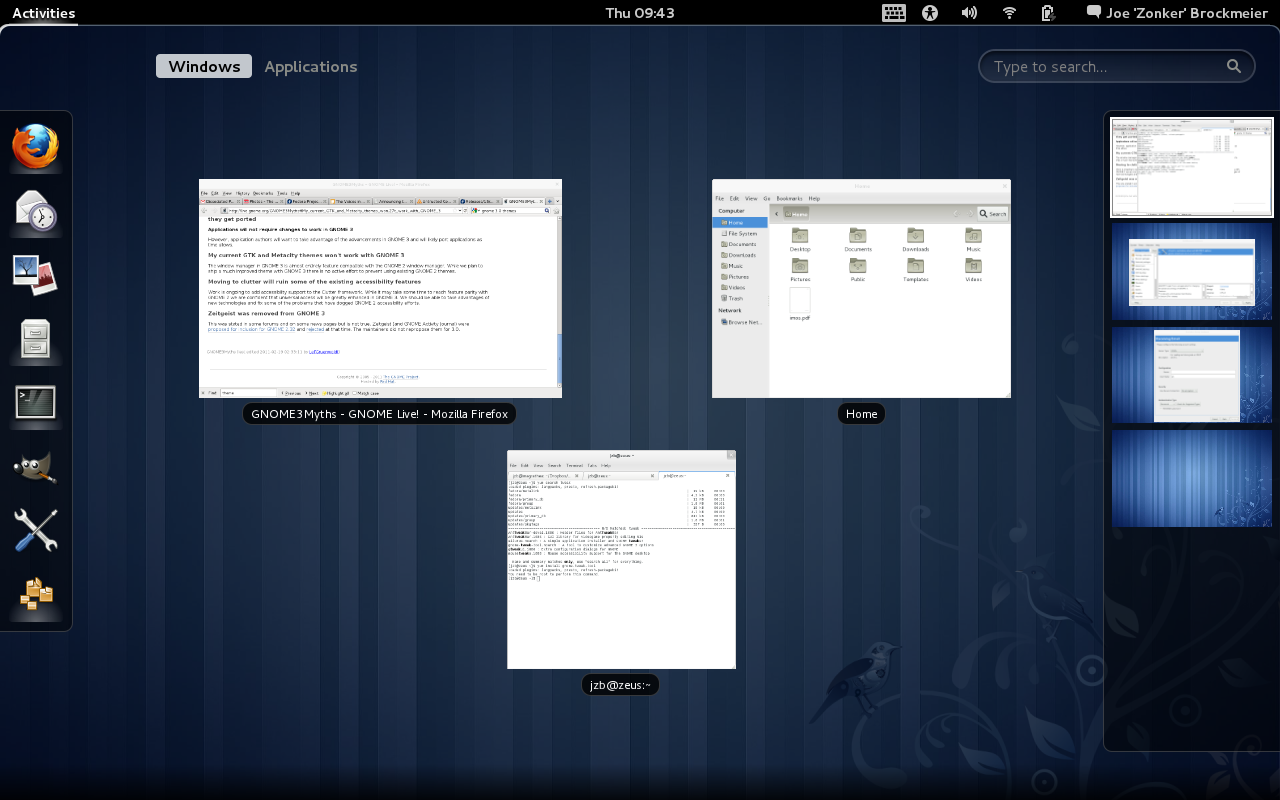
That said, I like some things about GNOME Shell. I am not crazy about the panel, but I like the window tiling and the ability to search through windows. I like the way it creates workspaces. I'm not crazy about missing the keybinding (Ctrl-Alt-right or Ctrl-Alt-left, etc.) for switching between workspaces. Obviously, the vi-loving, shortcut-knowing crowd is not the audience the GNOME folks had in mind here.

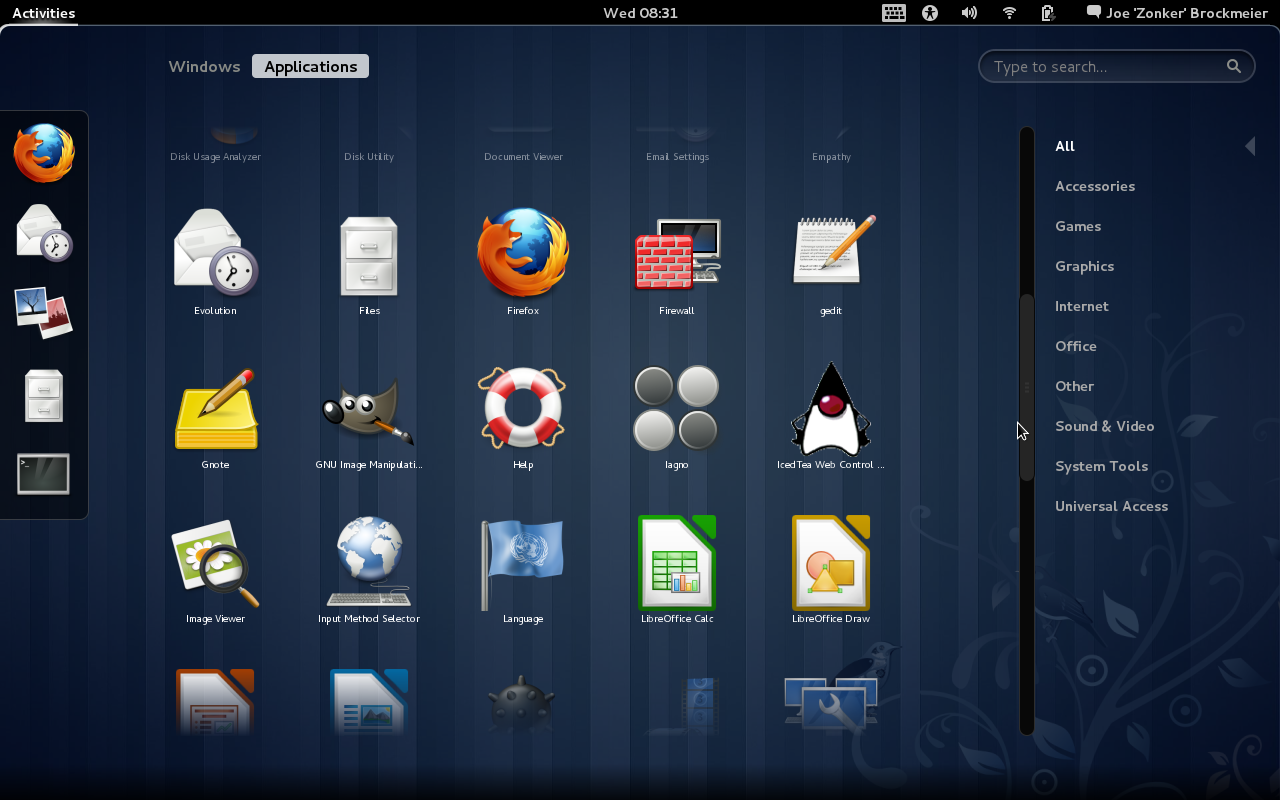
The application picker needs some clean-up. Instead of choosing an application from the GNOME Menu, you now have a application picker that displays all the program icons in a grid, plus "favorites" on the side. You've seen similar layouts on Android phones and devices running iOS. This looks great mostly — but I find the actual categorization a bit muddled and some of the icons aren't meant to be scaled up as large as they are in the picker, so they look terrible. The favorites need some work as well. There's no obvious way at the moment to change the icons associated with the favorites. I've added the Tweak Tool and System Settings to the favorites, but both have the same icon.

With Shell, you also "lose" the desktop as a place to plop files and shortcuts, and no more right-clicking on the desktop to open a terminal. Yet you still have the Desktop folder to save files to. Not sure this makes sense. I'm disappointed that the GNOME project has never implemented something like the KDE plasmoid for the desktop, which is one of the KDE 4.x features I really like. You can restore this by going into the Tweak Tool and setting "Have file manager handle the desktop."

Compositing Conundrum

The biggest thing that annoys me about GNOME Shell is that it requires compositing, thus requiring supported 3D hardware and ruling out some of my hardware and running GNOME Shell in VMware. Guess who has two thumbs and likes to be able to use distros in VMware when traveling? This guy.


You're not totally out in the cold without supported 3D hardware, you just wind up being dropped to the fallback or having to choose a different desktop. But the fallback option, frankly, isn't as good as either GNOME 2 or GNOME 3 with GNOME Shell.

The panel that ships with Shell has some nice ideas. I like the calendar/to-do integration with Evolution, though I'm usually not an Evo user. I miss the time zones, though. It took me a bit to realize that the mouse and other Accessibility options had migrated to the Panel and the Universal Access control dialog. It initially looked like those options were dropped altogether, but they've just been moved out of the mouse/touchpad settings and into Universal Access. This probably does make more sense, it just confused me because I'm used to the old way of doing things.
We'll call GNOME Shell a mixed bag. It has promise, some obvious nifty features, and a bit of improvement ahead. It will also require that most users re-think the way that they use the computer a bit. This requires a bit of an open mind — but we're creatures of habit. We don't necessarily want to have to re-approach our UI with an open mind.

Software Selection and More

Looking at the default selection of software, Fedora hasn't changed greatly since Fedora 14. They have swapped out OpenOffice.org for LibreOffice, and you have Firefox 4, Empathy for IM and IRC, and so on. No surprises or big new packages, really.

Naturally, the default selection of software is always missing at least one tool that most of us want. How is Fedora 15 when it comes to handling packages? Overall, good. Most of the software I'd want that wasn't installed by default was available from the default repos, and the PackageKit GUI is easy to use.

But not all is perfect in packageland. One of the things I've consistently run into with Fedora over the years is problems installing packages. This run was no different. For instance, I tried to install a package called gnotime and received an error about "An unspecified transaction error," because "gnotime-2.3.0-8.fc15.i686 requires libgtkhtml-3.15.so.19." This wasn't the first error I ran into. I can't recall the last time I ran into a similar error using another major distribution's stable release. Worse, the dialog that tells you that you have this problem doesn't let you fix it. You have to confirm the error and then wade back into the software selection to uncheck the offending package. This kind of error is the sort of thing that annoys the heck out of experienced users, and sends inexperienced users running for the hills — or, worse, back to Windows.

Naturally, Fedora doesn't provide codecs for things like MP3 playback and doesn't ship non-free software like Flash. The project has perfectly valid reasons for doing so, both legal and philosophical — but that doesn't change the fact that this is an additional hassle for users who want or need those things.

After using the final Fedora 15 for a few days, I've gotten used to its quirks and been able to tame it to my liking. So it's suitable for use, if you know what you're doing. But it's not perfect or close to perfect out of the box for my use, like Linux Mint.

Summary

Despite a few harsh words, I actually like Fedora 15 — and I could warm to GNOME 3 and Shell if they fix some of the problems and give the user more control over the desktop.

A big problem for Fedora, and for just about any Linux distribution, is trying to figure out who the audience is. The design philosophy for the default desktop, GNOME 3, seems to focus on new users. The rest of the Fedora distribution is aimed at power users and developers. I feel a bit of a disconnect there. But I plan to spend a lot of time using Fedora to see if I don't warm to GNOME 3 more than I did initially, and writing up a few tutorials on using SELinux tools and so forth.

Should you try Fedora 15? If you're a power user, definitely. If you're a less experienced user, then you might want to try Fedora 15, but not on your main computer. I would not recommend using Fedora as a go-to Linux distro for friends or family that haven't tried Linux before.

If you're a loyal Fedora user who's been on the GNOME desktop, you have a couple of options. If GNOME Shell doesn't appeal to you, there's the option to force the "fallback" mode. You could also sit out the F15 release and wait for F16 and the next GNOME release. I suspect it will fix a lot of the problems (read: restore functionality that was unwisely removed) that 3.0 has.

Another option? Try the Xfce release for a cycle. Xfce is feeling a lot like GNOME 2, and that's not a bad thing.

In a nutshell, Fedora 15 is a typical Fedora release. It's solid, but there's a few bugs and the thrill of living on the edge of development. Sometimes that means exciting new features and sometimes it means being annoyed that something that worked perfectly a release ago is off the table while it's re-implemented. But even if you don't use Fedora on your own machine, the odds are the work that's being done in Fedoraland will ultimately benefit you as a Linux user.

View the original article here

Monday, June 6, 2011

New!! Updated Intel(r) AMT Linux Drivers

Linux/AMT Developers have no doubt been waiting a long time for this.  Updated MEI and LMS drivers for Linux.  They can be download  HERE.  (and below as well)
Are you a Linux Developer interested in writing tools for supporting Intel AMT?  We would love to hear from you.

Here is what these drivers do:
Intel® Active Management Technology (Intel® AMT) Linux support includes two components that allow interaction between the Intel® AMT FW and the Linux OS: Intel® MEI (Intel® Management Engine Interface) driver and LMS (Local Management Service) driver. Intel® MEI driver allows application to communicate with the FW using host interface, and LMS driver allows applications to access the Intel® AMT FW via the local Intel® Management Engine Interface (Intel® MEI).

Intel® Management Engine Interface driver:
The Intel® MEI driver allows applications to access the Intel® Management Engine FW via the host interface (as opposed to a network interface). The Intel® MEI driver is meant to be used mainly by the Local Manageability Service (LMS). Messages from the Intel® MEI driver are sent to the systems log (i.e. /var/log/messages). Once the Intel® MEI driver is running, an application can open a file to it, connect to an application on the firmware side, and send and receive messages to that application.


Intel® Local Manageability Service:


The Local Manageability Service (LMS) allows applications to access the Intel® Active Management Technology FW via the local Intel® Management Engine Interface (Intel® MEI). The LMS is dependent on the Intel® MEI driver. Intel® MEI driver should be installed prior to installing the LMS. The LMS runs as a daemon. Messages from the service will be sent to the syslog. The LMS messages will be marked with a source of "LMS". Once the LMS is running, it listens for incoming connection requests on the following ports:
  •  Port 16992 for soap and WS-Management requests.
  •  Port 623 for WS-Management requests 
If a secure connection with the Intel® AMT device is enabled (TLS), LMS also listens on these ports:
  • Port 16993 for secure soap and WS-Management requests.
  • Port 664 for secure WS-Management requests.
Download the LMS driver

Learn how to install the software here - or you can use the RPMs included in the SLED-11, Kernel 2.6.32.12-0.7.
Linux Enablement Guide 


View the original article here